
ในภูมิทัศน์การศึกษาที่พัฒนาขึ้นอย่างรวดเร็วในปัจจุบันเทคโนโลยีกำลังปฏิรูปวิธีที่ครูสอนและนักเรียนเรียนรู้ในบรรดาเครื่องมือที่เปลี่ยนแปลงได้มากที่สุดคือบอร์ดดิจิตอลแบบโต้ตอบ-อุปกรณ์อเนกประสงค์ที่รวมฟังก์ชันการทำงานของคอมพิวเตอร์โปรเจคเตอร์หน้าจอสัมผัสและระบบเสียงเข้ากับจอแสดงผลอัจฉริยะเดียว Qtenboard ได้นำแนวคิดนี้ไปสู่ระดับต่อไปโดยให้โรงเรียนและสถาบันการศึกษาพร้อมเครื่องมือการสอนอันทรงพลังที่ช่วยเสริมการโต้ตอบความคิดสร้างสรรค์และประสิทธิภาพในห้องเรียน
หนึ่งในคุณสมบัติที่ใช้งานได้จริงที่สุดของบอร์ดดิจิตอลแบบโต้ตอบ qtenboard คือความสามารถในการบันทึกหน้าจอฟังก์ชั่นนี้ช่วยให้ครูและนักเรียนสามารถบันทึกบทเรียนการทดลองหรือการประชุมร่วมกันและแบ่งปันให้กับการทบทวนในภายหลังความสามารถในการจับภาพปฏิสัมพันธ์ในห้องเรียนไม่เพียงแต่เสริมสร้างประสบการณ์การเรียนรู้แต่ยังรักษาเนื้อหาการสอนที่สำคัญสำหรับการใช้งานในอนาคต
ลองนึกภาพครูวิทยาศาสตร์ที่ทำการทดลองทางเคมีด้วยการตั้งค่าแบบดั้งเดิมนักเรียนอาจพยายามที่จะจำทุกขั้นตอนด้วยกระดานดิจิตอลแบบโต้ตอบ qtenboard ครูสามารถบันทึกกระบวนการทั้งหมดทำให้นักเรียนสามารถเยี่ยมชมบทเรียนได้ตามจังหวะของตนเองในทำนองเดียวกันนักเรียนสามารถใช้ฟังก์ชันการบันทึกเพื่อบันทึกกระบวนการแก้ปัญหาการนำเสนอหรือโครงการกลุ่มได้สำหรับสถานการณ์การเรียนรู้ระยะไกลคุณสมบัติการบันทึกหน้าจอจะเชื่อมโยงช่องว่างระหว่างครูและนักเรียนทำให้บทเรียนสามารถก้าวข้ามห้องเรียนทางกายภาพและข้อจำกัดด้านเวลา
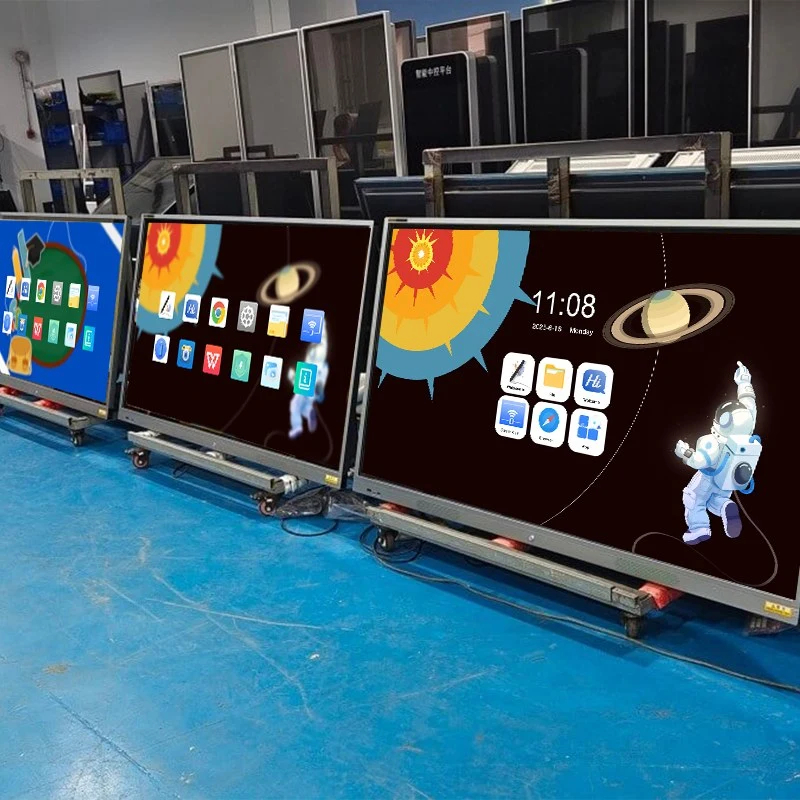
อีกคุณสมบัติที่สำคัญของบอร์ดดิจิตอลแบบโต้ตอบ qtenboard. ครูและนักเรียนสามารถจับภาพเนื้อหาใดๆบนหน้าจอได้ทันทีและบันทึกเป็นไฟล์ภาพสิ่งนี้มีประโยชน์อย่างยิ่งเมื่อเน้นประเด็นสำคัญรักษากรณีการสอนหรือสร้างสื่อการสอน
ตัวอย่างเช่นในระหว่างบทเรียนประวัติศาสตร์ครูอาจแสดงไทม์ไลน์หรือแผนที่โต้ตอบโดยการถ่ายภาพหน้าจอครูสามารถรบกวนพืชหรือเน้นส่วนที่สำคัญในการสร้างสื่อการสอนนักเรียนยังสามารถจับภาพหน้าจอของบันทึกย่อไดอะแกรมหรืองานกลุ่มเปลี่ยนช่วงเวลาที่หลบหนีของข้อมูลเชิงลึกลงในแหล่งข้อมูลการเรียนรู้ถาวรฟังก์ชันภาพหน้าจอรองรับการแก้ไขเพิ่มเติมเช่นคำอธิบายประกอบและการปรับปรุงเพื่อให้มั่นใจว่าภาพที่ถ่ายจะสอดคล้องกับวัตถุประสงค์ทางการศึกษาอย่างสมบูรณ์แบบ
นอกเหนือจากการบันทึกหน้าจอและภาพหน้าจอกระดานดิจิตอลแบบโต้ตอบ qtenboard นำเสนอระบบนิเวศที่หลากหลายของคุณสมบัติที่ออกแบบมาเพื่อเพิ่มการมีส่วนร่วมในห้องเรียนด้วยความสามารถแบบมัลติทัชนักเรียนหลายคนสามารถโต้ตอบกับบอร์ดได้พร้อมกันส่งเสริมการทำงานร่วมกันและการเรียนรู้ที่กระฉับกระเฉงครูสามารถเปิดหลายหน้าต่างในครั้งเดียวแสดงวิดีโอคำอธิบายประกอบเนื้อหาและรวมทรัพยากรมัลติมีเดียได้อย่างลงตัว-ทั้งหมดจากอุปกรณ์เดียว
จอแสดงผลความละเอียดสูง4K ของ qtenboard ช่วยให้มั่นใจได้ถึงภาพที่คมชัดทำให้ข้อความไดอะแกรมและวิดีโอสดใสและอ่านง่ายไม่ว่าจะนำเสนอการทดลองทางวิทยาศาสตร์โดยละเอียดสูตรทางคณิตศาสตร์หรือบทเรียนศิลปะแบบโต้ตอบความชัดเจนของกระดานดิจิตอลแบบโต้ตอบ qtenboard ช่วยเพิ่มความเข้าใจและช่วยให้นักเรียนมุ่งเน้น
Qtenboard ยังรวมฟังก์ชันการทำงานของ Ai ที่ยกระดับบทบาทของกระดานดิจิตอลแบบโต้ตอบในห้องเรียนสมัยใหม่:
เครื่องมือ Ai เหล่านี้ไม่เพียงแต่ประหยัดเวลาแต่ยังช่วยให้ครูและนักเรียนมีปฏิสัมพันธ์กับเนื้อหาได้อย่างมีประสิทธิภาพมากขึ้นให้สภาพแวดล้อมการเรียนรู้แบบไดนามิกที่ปรับให้เข้ากับสถานการณ์ในห้องเรียนแต่ละ
การรวมกันของการบันทึกหน้าจอฟังก์ชันภาพหน้าจอการโต้ตอบแบบมัลติทัชและการรวม Ai ทำให้กระดานดิจิตอลแบบโต้ตอบของ qtenboard เป็นเครื่องมือการเรียนการสอนที่ขาดไม่ได้
ครูสามารถบันทึกบทเรียนบันทึกสไลด์และแบ่งปันวัสดุได้ทันทีนักเรียนสามารถเยี่ยมชมบทเรียนมีส่วนร่วมแบบโต้ตอบและรวบรวมความรู้ได้อย่างมีประสิทธิภาพ
บทเรียนและภาพหน้าจอที่บันทึกไว้ช่วยให้นักเรียนจากสถานที่ใดๆสามารถเข้าถึงเนื้อหาการเรียนการสอนที่มีคุณภาพสูงทำให้การศึกษาทางไกลดื่มด่ำมากขึ้น
ความสามารถในการสัมผัสของผู้ใช้หลายคนช่วยให้สามารถทำงานเป็นกลุ่มที่ความคิดสามารถแสดงแก้ไขและบันทึกไว้ในเวลาจริงสนับสนุนการเรียนรู้แบบเพียร์และความคิดสร้างสรรค์
บอร์ดดิจิตอลแบบโต้ตอบทั้งหมดไม่ได้สร้างขึ้นอย่างเท่าเทียมกัน Qtenboard โดดเด่นด้วยการผสมผสานระหว่างความทนทานจอแสดงผลความละเอียดสูงเทคโนโลยีการสัมผัสขั้นสูงและซอฟต์แวร์อัจฉริยะอินเทอร์เฟซที่ใช้งานง่ายรวมกับฮาร์ดแวร์ที่ทนทานช่วยให้มั่นใจได้ถึงความน่าเชื่อถือในระยะยาวและการทำงานที่ราบรื่นไม่ว่าจะในห้องเรียนห้องปฏิบัติการหรือสถานการณ์การสอนออนไลน์
สิ่งสำคัญคือต้องทราบว่าการใช้งานที่แน่นอนของการบันทึกหน้าจอและฟังก์ชั่นภาพหน้าจออาจแตกต่างกันไปในหมู่แบรนด์และรุ่นด้วย qtenboard ฟังก์ชันเหล่านี้ได้รับการปรับให้เหมาะสมและออกแบบมาเพื่อการใช้งานที่ราบรื่นทำให้ครูสามารถรวมเข้ากับการสอนประจำวันได้ง่ายขึ้นโดยไม่มีอุปสรรคทางเทคนิค
สรุปกระดานดิจิตอลแบบโต้ตอบ qtenboard ทำมากกว่าข้อมูลการแสดงผล-มันเปลี่ยนการเรียนการสอนและการเรียนรู้เป็นประสบการณ์ที่มีส่วนร่วมโต้ตอบและมีความยืดหยุ่นด้วยความสามารถในการบันทึกหน้าจอและภาพหน้าจอการโต้ตอบแบบมัลติทัชการรวม Ai และภาพความละเอียดสูง4K, และเชื่อมช่องว่างระหว่างบุคคลและการเรียนรู้ระยะไกล
ในฐานะที่เป็นเทคโนโลยีการศึกษายังคงพัฒนาคณะกรรมการดิจิตอลแบบโต้ตอบพิสูจน์ตัวเองว่าเป็นรากฐานที่สำคัญของการศึกษาที่ทันสมัยการเลือก qtenboard ช่วยให้มั่นใจได้ว่าโรงเรียนและนักการศึกษาไม่เพียงแต่ก้าวไปกับอนาคตเท่านั้นแต่ยังสร้างบทเรียนเชิงโต้ตอบแบบ IT-One ในแต่ละครั้ง
คลิกเพื่ออ่านรายละเอียดผลิตภัณฑ์และเรียนรู้เกี่ยวกับคุณสมบัติการทำงานและประสิทธิภาพที่แท้จริง
📖อ่านผลิตภัณฑ์
 TH
TH
 EN
EN  MAY
MAY  CHT
CHT  ID
ID  BUR
BUR  FIL
FIL  HKM
HKM  LAO
LAO  SIN
SIN  VIE
VIE